
AI Virtual Staging: How to Fill Empty Rooms Without a Staging Company
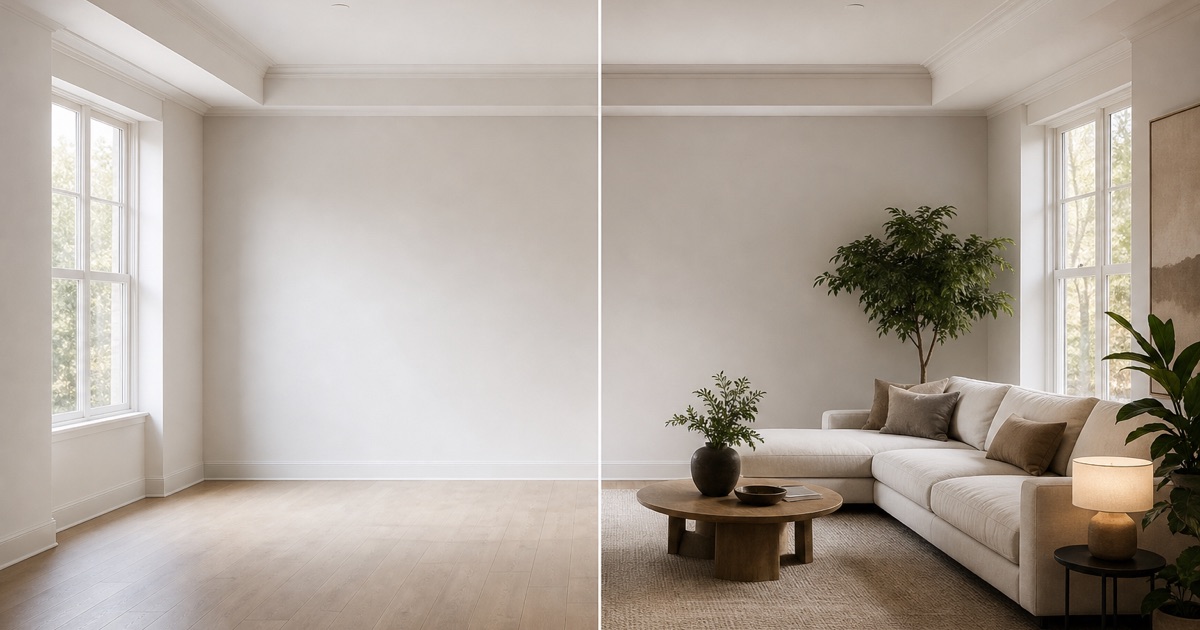
Empty rooms hurt real estate listings. A buyer walking through a vacant space struggles to imagine its purpose, scale, and potential. Traditional staging costs thousands and takes days. AI virtual staging solves this by filling empty rooms with furniture directly inside your listing video. Here's how it works and when to use it.
What is AI Virtual Staging?
AI virtual staging uses generative models to add furniture and decor to photos or videos of empty rooms. Instead of renting physical furniture, hiring movers, and styling a space for days, an AI system digitally fills the room in seconds. The result is a furnished space that buyers can visualize as a potential home. It's faster and cheaper than traditional staging, but the output looks AI-generated if done carelessly.
Why Do Empty Rooms Hurt Real Estate Listings?
A vacant room is functionally invisible to a buyer. Without furniture or context, a buyer can't judge the room's scale, purpose, or value. A bare bedroom doesn't feel like a bedroom. A empty living room has no energy. Furnished spaces tell a story and help buyers connect emotionally with the property. This is why staging has been a standard practice for decades.
Traditional Staging vs. Virtual Staging vs. AI Staging in Video
Each approach has trade-offs:
- Traditional staging: Rent furniture, hire movers, and style the space in person. Takes multiple days. Works great for open houses and in-person showings. Expensive for properties with multiple vacant spaces.
- Virtual staging (AI on photos): Use AI to digitally add furniture to still photos. Cheap and fast. Works well for MLS photos. Buyers may not trust the image since it doesn't reflect reality when they visit.
- AI staging in video: Use AI to add furniture as you film the property moving through rooms. The furniture appears in motion, in context, across multiple angles. Buyers see the potential without the uncanny feeling of a static AI image. Video is more convincing than photos.
Video staging works because movement and depth make the illusion believable. When a buyer sees a room from multiple angles with lighting and perspective changes, the staged furniture feels real.
How HomeReel's Stage It Feature Works
HomeReel's Stage It motion style lets you upload photos of empty rooms and generates a cinematic video where furniture appears inside those rooms. Here's the workflow:
- Upload 3-20 photos of empty rooms from your phone or camera.
- Select the Stage It motion style in the app.
- Describe the room type (bedroom, living room, kitchen) and desired style (modern, cozy, minimalist).
- HomeReel generates a polished video where the AI adds appropriate furniture and decor to each room.
- Download the HD video and post it to Instagram Reels, TikTok, YouTube Shorts, or MLS.
The staging happens inside the video generation process, not as a post-processing step. This means the furniture is contextually placed, lit properly, and moves naturally with the camera. The first listing video is free with no credit card required. You get 60 seconds of polished, professional-looking video that would cost thousands with traditional staging.
When Should You Use AI Staging?
AI staging is most effective when:
- You have an empty property that won't sell well unfurnished.
- The property is a new build or a flip without existing furniture.
- You want to show the property's potential quickly without spending on traditional staging.
- You're creating content for social media (Reels, TikTok, Shorts) where video performs better than photos.
- You're competing with other listings in the same area and need an edge.
Skip AI staging if the property is already furnished, if staging is against your local MLS rules, or if you want to show the space exactly as it is.
Disclosure and MLS Rules: Always Label Virtually Staged Content
This is critical: always disclose if a room is virtually staged. A buyer who visits the property expecting furnished rooms and finds empty ones will feel misled. Most MLS systems require clear labeling of virtually staged or AI-modified images.
Check your local MLS rules before posting. Some MLSs require a watermark or caption saying "virtually staged" or "AI-generated". Others allow it in supplements but not in primary photos. A few disallow it entirely. Before you list, read your MLS guidelines or ask your broker.
For video, the rules vary by platform. YouTube Shorts and TikTok don't have specific AI staging rules, but Instagram Reels should include a disclosure in the caption or video description. When you upload to the MLS, check whether your MLS allows AI-modified videos and whether you need to label them.
Best practice: include a text overlay in the video saying "Virtually Staged" or add it to the caption. This protects you legally and builds buyer trust. A buyer who knows what they're seeing is more likely to schedule a showing than one who feels deceived.
For detailed MLS compliance, read our MLS video guide and our post on using AI video on the MLS.
The Bottom Line
AI staging in video is a fast, affordable way to show empty properties as furnished spaces. It works because video + motion + depth convince buyers more than static images. But only use it if you disclose it clearly and follow your MLS rules.
If you want to try it, upload your first listing video for free. Use Stage It to generate a polished, professionally-looking cinematic video in minutes. Then label it, post it to your channels, and track how it performs. Most agents find that staged video listings get more interest, more showings, and faster sales.
Buyers connect with furnished spaces faster than empty ones. AI staging lets you show potential without the cost or time of traditional staging.
Frequently asked questions
Your first listing video is free. No editing skills, no videographer.
Try HomeReel Free